
AI Directory : AI Photo & Image Generator, AI Video Generator, Image to Video, Text-to-Speech
What is Creen AI?
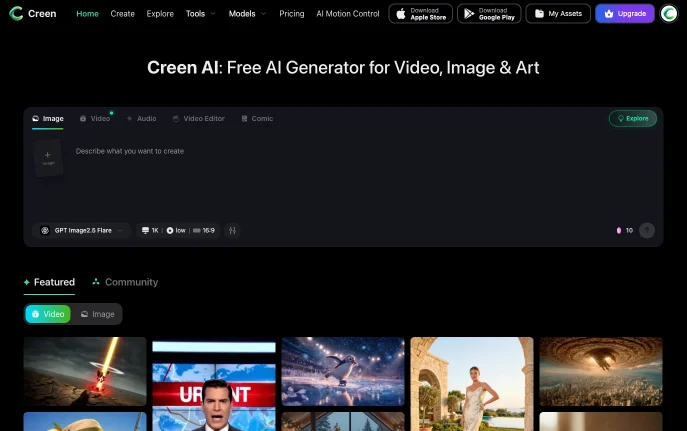
Creen AI is a browser-based generator for video, images and audio that puts more than 40 models in one workspace, including Sora 2, VEO 3.1, Seedance 2.0, Kling V3 and Nano Banana Pro. It is run by CODESAIL LIMITED in Hong Kong and also has iOS and Android apps. Creen is built for creators who want to compare several engines on the same prompt without opening separate tools or subscriptions.
How to Use Creen AI
Open creen.ai and the studio loads with tabs for Image, Video, Audio, Video Editor and Comic. Type a prompt or add a reference image, pick a model from the selector under the prompt box, set resolution and aspect ratio, and submit. Creen says you can start without an account; signing in with Google or Apple unlocks 100 daily free credits and lets you save work under My Assets.
For motion, generate a still first and send it to image-to-video, or write a scene directly in the video tab. Generated clips can then be layered with audio from the text-to-speech and voice tools before you download.
Key Features
- Large model lineup 28 video models, 11 image models and 7 audio models selectable from one menu.
- High-resolution output Images up to 4K (3840 × 2160) and video at 1080p, 24fps, with clips up to 10 seconds.
- Image-to-image with references Upload several reference images at once to combine a face, an outfit and a background.
- Seed control Each generation shows its seed so the same prompt can reproduce a composition.
- Audio tools Text-to-speech and voice cloning with MiniMax Speech and Gemini TTS models.
Why Choose Creen AI?
Single-model platforms tie you to one look; Creen lets you run the same prompt through different engines and compare results side by side. The free daily quota is meant for lighter models such as Z-Image Turbo, Seedream 5.0 Lite and Nano Banana 2, while premium models such as Sora 2 Pro and VEO 3.1 consume credits. Paid plans add no watermark, commercial use rights and private content.
Use Cases and Applications
Creators use it to draft short social videos, animate a product photo, test poster concepts in several styles, and add a voiceover to a clip in the same tab. It also suits anyone choosing between video models, since one prompt can be sent to Sora 2, VEO 3.1 and Kling V3 to compare motion before committing to a paid plan elsewhere.
Frequently Asked Questions
Is Creen AI free?
Yes, with limits. You can start creating without signing up, and Google or Apple sign-in gives 100 daily free credits. Paid plans start at Plus, $15 per month or $7.50 per month billed annually, with 3,000 monthly credits.
What do the paid plans include?
Plus has 3,000 credits a month, Pro ($29 monthly or $14.50 annually) has 8,000, and Max ($59 monthly or $29.50 annually) has 20,000. Credit packs that never expire start at $10 for 3,000 credits.
How long can Creen AI videos be?
Clips go up to 10 seconds at 1080p and 24fps.