
AI Directory : AI Animated Video, AI Animation Generator, AI Avatar Video Generator, AI Cartoon Video Generator, AI Commercial Generator, AI Face Swap Video, AI Movie Generator, AI Music Video Generator, AI Short Video Generator, AI Tiktok Video Generator, AI UGC Video Generator, AI Video Editor, AI Video Generator, AI Youtube Video Maker, Image to Video, Text to Video, Video to Video
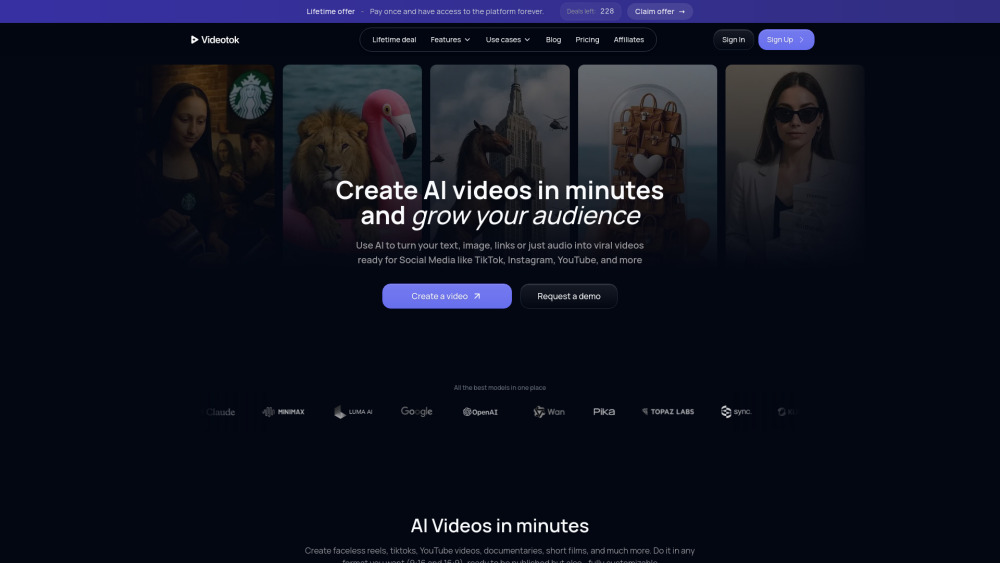
What is Videotok?
Videotok is an AI video generator for content creators and brands that automates the whole video creation process. Videotok replaces all the tools used in the traditional video production workflow. ––– This was the video creation workflow BEFORE Videotok: 1. Create the script and image prompts using ChatGPT, etc. 2. Copy the image prompts and generate each image in Leonardo, Midjourney, etc. 3. Copy the animation prompts and generate each animation in tools like Kling, Sora, etc. 4. Record or generate voiceovers separately using the ChatGPT-generated script 5. Manually edit and assemble everything in CapCut or similar tools 6. Spend hours on each video trying to find the best video editing setup ––– This is today’s video creation workflow WITH Videotok: 1. Type a topic or video description using natural language, or paste a link (article, YouTube video, etc.) 2. Get a ready-to-publish video in one minute complete with visuals, animations, voiceovers, and transitions 3. No editing skills needed: everything is automated. But if you want to add your personal touch, or you're a Pro or a brand, you can customize every element of the video in the editor (For instance, a brand can create visuals featuring its products by changing settings and scenes to generate all the assets needed for marketing campaigns)
How to use Videotok?
1. Enter a video description in natural language, or provide a link to an article or video related to your topic, or upload your script 2. Choose your video features (aspect ratio, language, voice type, image or animation style, consistent characters, etc.) 3. Get a ready-to-publish video or customize it using the editor’s features (sound effects, music, AI-generated music based on the video scene, transition, add logos, scale-up, change image backgrounds, create new images or animations to add, avatars, and interact with assets to make any changes you want, etc.)
Videotok's Core Features
AI-powered text, link, audio to video
AI-powered video to sound & Image to video
Intuitive video editor
UGC Videos & AI Avatar videos
Voice Cloning & 300+ Unique Voices
Created assets storage (your assets are always available)
On-brand videos & Personal brand (AI-detected)
Consistent character videos
Automatic subtitle generation
Stock library of music and music effects
Videotok's Use Cases
Creating marketing and social media videos
Automate YouTube channel content
Produce professional videos for brands and businesses
Generate high-converting advertising videos
Make UGC-style promotional videos
Create AI-powered talking avatars
FAQ from Videotok
What makes Videotok different from other video creation tools?
Is Videotok beginner-friendly or do I need editing experience?
What types of videos can I create with Videotok?
Can I make changes to the videos generated by the AI?
How does Videotok help creators and brands grow?
Do I need to create all visuals and assets separately?
What are the pricing options and what’s included in each plan?
Is my personal data and content secure on Videotok?
Can I cancel or change my plan anytime?
How much time can Videotok actually save me?
Videotok Support Email & Customer service contact & Refund contact etc.
More Contact, visit the contact us page()
Videotok Company
Videotok Company name: .
Videotok Company address: .
More about Videotok, Please visit the about us page().
Videotok Login
Videotok Sign up
FAQ from Videotok
What is Videotok?
Videotok is an AI video generator for content creators and brands that automates the whole video creation process. nnVideotok replaces all the tools used in the traditional video production workflow. nn––– This was the video creation workflow BEFORE Videotok:nn1. Create the script and image prompts using ChatGPT, etc.n2. Copy the image prompts and generate each image in Leonardo, Midjourney, etc.n3. Copy the animation prompts and generate each animation in tools like Kling, Sora, etc.n4. Record or generate voiceovers separately using the ChatGPT-generated scriptn5. Manually edit and assemble everything in CapCut or similar toolsn6. Spend hours on each video trying to find the best video editing setupnn––– This is today’s video creation workflow WITH Videotok:nn1. Type a topic or video description using natural language, or paste a link (article, YouTube video, etc.)n2. Get a ready-to-publish video in one minute complete with visuals, animations, voiceovers, and transitionsn3. No editing skills needed: everything is automated. But if you want to add your personal touch, or you're a Pro or a brand, you can customize every element of the video in the editor (For instance, a brand can create visuals featuring its products by changing settings and scenes to generate all the assets needed for marketing campaigns)
How to use Videotok?
1. Enter a video description in natural language, or provide a link to an article or video related to your topic, or upload your scriptnn2. Choose your video features (aspect ratio, language, voice type, image or animation style, consistent characters, etc.)nn3. Get a ready-to-publish video or customize it using the editor’s features (sound effects, music, AI-generated music based on the video scene, transition, add logos, scale-up, change image backgrounds, create new images or animations to add, avatars, and interact with assets to make any changes you want, etc.)
What makes Videotok different from other video creation tools?
Videotok brings the entire video production process into one AI-powered platform. No more switching between tools for script writing, visuals, animations, or editing: everything is automated and streamlined.
Is Videotok beginner-friendly or do I need editing experience?
No editing skills or experience required! Videotok is built for creators of all levels. Users don’t need prior knowledge of video editing or content creation to use Videotok effectively. This makes it especially useful for content creators, marketers, entrepreneurs, and brands who want to produce engaging video content quickly and efficiently, without relying on a production team or learning complex tools.
What types of videos can I create with Videotok?
You can use Videotok to generate a wide range of content: from short-form videos for platforms like YouTube Shorts, TikTok, and Instagram Reels, to ad creatives, explainer videos, AI avatar presentations, and UGC-style promotional clips. The platform is designed to help you produce consistent and brand-aligned content quickly.
Can I make changes to the videos generated by the AI?
Yes! You can fully customize your videos from replacing images and voiceovers to adjusting animations, background music, avatars, and more. Videotok offers both automation and creative control. And that’s not all. You can also interact with all the assets you’ve created or uploaded to the platform to modify them (for instance, you can change the background of an object turning a forest into a Caribbean beach, depending on your creative goal, etc.).
How does Videotok help creators and brands grow?
By removing production bottlenecks. Videotok automates the entire video creation workflow from script to visuals, animations, voiceovers, and editing. So you can go from idea to ready-to-publish video in just one minute. No need for multiple tools or editing skills. You can publish faster, stay consistent with your brand voice, and test multiple formats or campaigns, all without a big team or agency.
Do I need to create all visuals and assets separately?
No, Videotok automatically generates all images, animated clips, voiceovers, captions, and more in about a minute. The content creator only needs to describe the video topic using natural language. Within seconds, all the assets will be created and displayed in the editor. Each image or video is saved with a name/label, so when you search for a word, you can see all your assets and previous generations related to that topic.
What are the pricing options and what’s included in each plan?
Videotok offers flexible plans for individual creators and businesses. Each plan includes access to the AI video generator, editor, asset storage, and export tools. Visit www.videotok.app for full details.
Is my personal data and content secure on Videotok?
Yes, your data and creative assets are stored securely, and we prioritize user privacy with robust protections. All data uploaded by the user or generated through the platform cannot be used in any way.
Can I cancel or change my plan anytime?
Of course. You can upgrade or cancel your subscription whenever you like, directly from your dashboard.
How much time can Videotok actually save me?
Videotok can save you a significant amount of time, potentially hours or even days. Tasks that once required an entire team and a suite of tools, can now be completed by a single person in less than a minute.