
AI Directory : AI Animated Video, AI Animation Generator, AI Cartoon Video Generator, AI Commercial Generator, AI Face Swap Video, AI GIF Generator, AI Lip Sync Generator, AI Movie Generator, AI Music Video Generator, AI Reel Generator, AI Short Video Generator, AI Stock Video Generator, AI Tiktok Video Generator, AI UGC Video Generator, AI Video Editor, AI Video Enhancer, AI Video Generator, AI Video Recording, AI Video Search, AI Video Summarizer, AI Video Upscaler, AI Vtuber, AI Youtube Video Maker, Image to Video, Script To Video AI Generator, Text to Video
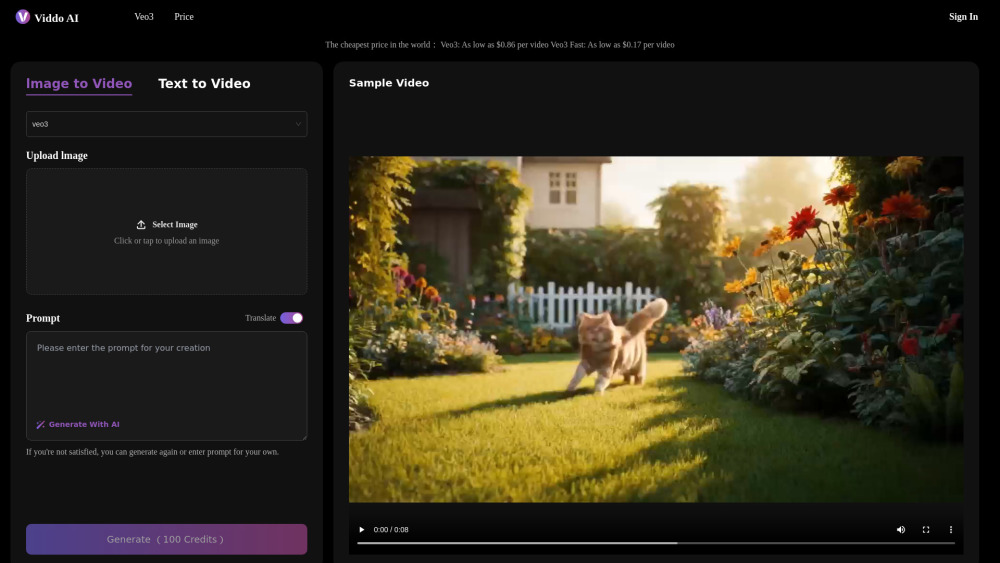
What is Viddo-Veo3 AI Video Generator?
The most cheapest veo3 AI video generator platform:Veo3: As low as $0.86 per video Veo3 Fast: As low as $0.17 per video
How to use Viddo-Veo3 AI Video Generator?
1. Sign Up or Log In to Viddo.ai To get started, simply create an account or log in to your existing one at Viddo.ai. This gives you access to all features, including the latest Veo3 video generation capabilities. 2. Access the Veo3 Model Interface Once logged in, navigate to the Veo3 feature section on the dashboard. This is your entry point to powerful AI-driven video generation. 3. Choose Between Text-to-Video or Image-to-Video Select your preferred creation mode:Text-to-Video lets you generate dynamic videos from written prompts;Image-to-Video allows you to animate static images into moving scenes. 4. Enter a Prompt or Let Our AI Help You Create One Enter your own descriptive prompt, or use our built-in AI assistant to help you craft a compelling one. The more specific and imaginative your prompt, the better the results. 5. Select Your Desired Video Aspect Ratio Choose the appropriate aspect ratio for your video output—whether it's 16:9 for YouTube, 9:16 for social stories, or 1:1 for square platforms. This ensures your content fits perfectly across different media channels.
Viddo-Veo3 AI Video Generator's Core Features
AI Video Generator
Text-to-Video
Image-to-Video
Ultra HD Video Produced
Immersive Audio That Matches the Visual Narrative
Context-Aware Scenes for Human-Centric Storytelling
Viddo-Veo3 AI Video Generator's Use Cases
Make a Product Video
Make a Brand Promotional Video
Create Animated Commentary
Conversion Dynamics Video Course
Create social media video clips for YouTube, TikTok, Instagram, etc
Quickly Create Game Scenes
FAQ from Viddo-Veo3 AI Video Generator
What is Veo3 of Viddo AI Video Generator, and how is it different from other video generation tools?
Do I need video editing experience to use Veo3 with Viddo AI Video Generator ?
Can I control the style or look of the video?
What types of content can I create with Veo3 with Viddo AI Video Generator ?
Can I add audio to the videos?
Viddo-Veo3 AI Video Generator Support Email & Customer service contact & Refund contact etc.
More Contact, visit the contact us page()
Viddo-Veo3 AI Video Generator Company
Viddo-Veo3 AI Video Generator Company name: .
Viddo-Veo3 AI Video Generator Company address: .
More about Viddo-Veo3 AI Video Generator, Please visit the about us page().
Viddo-Veo3 AI Video Generator Login
Viddo-Veo3 AI Video Generator Sign up
FAQ from Viddo-Veo3 AI Video Generator
What is Viddo-Veo3 AI Video Generator?
The most cheapest veo3 AI video generator platform:Veo3: As low as $0.86 per videonVeo3 Fast: As low as $0.17 per video
How to use Viddo-Veo3 AI Video Generator?
1. Sign Up or Log In to Viddo.ainTo get started, simply create an account or log in to your existing one at Viddo.ai. This gives you access to all features, including the latest Veo3 video generation capabilities.n2. Access the Veo3 Model InterfacenOnce logged in, navigate to the Veo3 feature section on the dashboard. This is your entry point to powerful AI-driven video generation.n3. Choose Between Text-to-Video or Image-to-VideonSelect your preferred creation mode:Text-to-Video lets you generate dynamic videos from written prompts;Image-to-Video allows you to animate static images into moving scenes.n4. Enter a Prompt or Let Our AI Help You Create OnenEnter your own descriptive prompt, or use our built-in AI assistant to help you craft a compelling one. The more specific and imaginative your prompt, the better the results.n5. Select Your Desired Video Aspect RationChoose the appropriate aspect ratio for your video output—whether it's 16:9 for YouTube, 9:16 for social stories, or 1:1 for square platforms. This ensures your content fits perfectly across different media channels.
What is Veo3 of Viddo AI Video Generator, and how is it different from other video generation tools?
Veo3 at Viddo is an advanced AI-powered video generation platform that transforms text or images into high-quality, cinematic videos—no editing skills required. It’s designed for creators, marketers, educators, and developers who want fast, studio-grade results.
Do I need video editing experience to use Veo3 with Viddo AI Video Generator ?
Not at all. Veo3 is built for simplicity. Just input your prompt or upload an image, and the system automatically generates a polished video for you—complete with motion, lighting, and optional audio.
Can I control the style or look of the video?
Yes. Veo3 supports style customization through seed parameters, aspect ratio settings, and prompt-based guidance. You can maintain visual consistency across scenes or generate diverse outputs based on creative needs.
What types of content can I create with Veo3 with Viddo AI Video Generator ?
You can create storytelling videos, social media posts, ads, educational explainers, game scenes, prototypes, and more. Whether you're a YouTuber, a brand manager, or a designer, Veo3 adapts to your creative goals.
Can I add audio to the videos?
Yes. Veo3 includes AI-generated audio options such as background music, ambient sound, and even voice narration—perfectly synced with the visual content to speed up your workflow.