
AI ディレクトリ : AI Image Enhancer, AI PDF, AI Watermark Remover, Object Remover AI
What is Unwatermark AI?
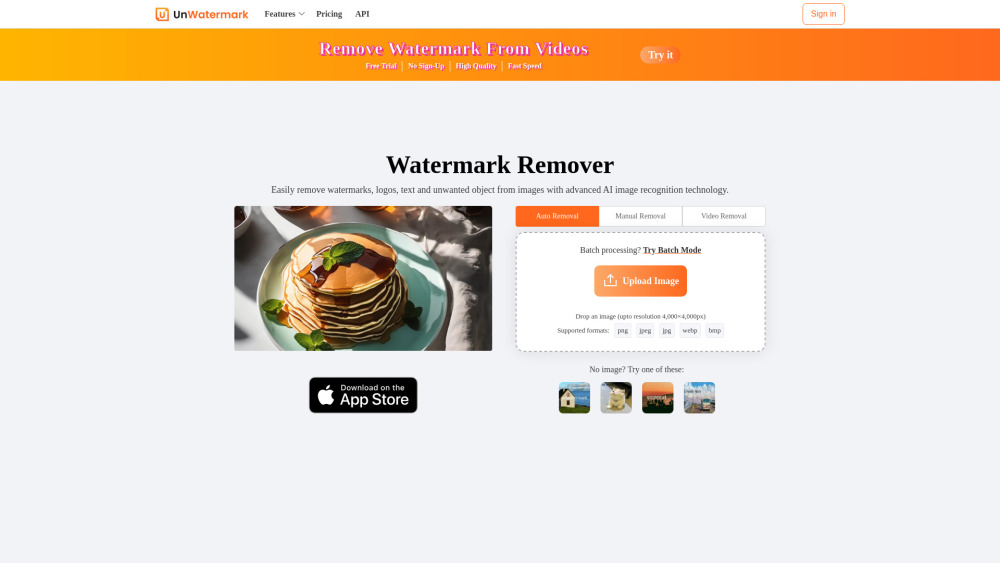
Unwatermark AI is an advanced AI-powered tool designed to remove watermarks, logos, text, and unwanted objects from both images and videos. It offers automatic detection and removal, a manual brush tool for difficult watermarks, and supports batch processing for images. The tool ensures high-quality output, maintaining the original integrity of the content. It is an online, user-friendly platform accessible across various devices (PC, Android, iOS) and supports common image and video formats.
How to use Unwatermark AI?
To use Unwatermark AI, follow these steps: 1. Upload image or video: Upload your watermarked photo or video. 2. Select Watermark with Brush: Use the Brush tool to select the watermark logo or text. 3. AI online Processing: Click the remove button, and the AI will process and remove the watermark from the painted area. 4. Download Clean Image or Video: Download your image or video after the watermark has been removed.
Unwatermark AI's Core Features
Automatic watermark detection and removal
Manual brush tool for precise watermark removal
Removes logos, text, stamps, objects, and AI-generated video watermarks
Batch watermark removal for images (up to 10 at once)
Supports various image (PNG, JPG, JPEG, WebP, BMP) and video (MP4, M4V, MOV) formats
High-quality output, maintaining original content integrity
Online tool, no software installation required
Fast processing speed
Preview function before download
Multi-terminal support (PC, Android, iOS)
Ensures user privacy by not storing uploaded images
Unwatermark AI's Use Cases
Managing and cleaning content materials effectively by removing watermarks from images and videos.
Quickly and efficiently handling various types of watermarks for content creation.
Assisting students in daily studies and creative projects by removing watermarks.
Removing watermarks from content sourced from platforms like YouTube, TikTok, and Instagram.
Cleaning AI-generated images or videos by removing their watermarks.
FAQ from Unwatermark AI
Is Unwatermark AI free to use?
What are Credits and how do they work?
Can I cancel my subscription?
Can I Request a Refund?
Is your payment service secure?
How to Contact Us?
What file types does Unwatermark support for watermark removal?
Can I remove watermarks from AI-generated images or videos?
Does Unwatermark support batch watermark removal?
Does Unwatermark support usage on Android or iOS devices?
Will purchased credits expire?
How do I need to choose the right package?
Unwatermark AI Support Email & Customer service contact & Refund contact etc.
More Contact, visit the contact us page(https://unwatermark.ai/en/privacy-and-cookies-policy/)
Unwatermark AI Company
Unwatermark AI Company name: Unwatermark AI .
Unwatermark AI Company address: .
More about Unwatermark AI, Please visit the about us page().
Unwatermark AI Login
Unwatermark AI Login Link: https://unwatermark.ai/pricing/
Unwatermark AI Sign up
Unwatermark AI Pricing
Unwatermark AI Pricing Link: https://unwatermark.ai/pricing/
Unwatermark AI Twitter
Unwatermark AI Twitter Link: https://x.com/Unwatermarkai
FAQ from Unwatermark AI
What is Unwatermark AI?
Unwatermark AI is an advanced AI-powered tool designed to remove watermarks, logos, text, and unwanted objects from both images and videos. It offers automatic detection and removal, a manual brush tool for difficult watermarks, and supports batch processing for images. The tool ensures high-quality output, maintaining the original integrity of the content. It is an online, user-friendly platform accessible across various devices (PC, Android, iOS) and supports common image and video formats.
How to use Unwatermark AI?
To use Unwatermark AI, follow these steps:n1. Upload image or video: Upload your watermarked photo or video.n2. Select Watermark with Brush: Use the Brush tool to select the watermark logo or text.n3. AI online Processing: Click the remove button, and the AI will process and remove the watermark from the painted area.n4. Download Clean Image or Video: Download your image or video after the watermark has been removed.
Is Unwatermark AI free to use?
Yes, Unwatermark AI offers a certain number of free uses daily (e.g., 3 free chances for images per day, 10 free previews for videos per week, or 100 images per day as mentioned in one FAQ). For more tasks or advanced features, paid plans are available.
What are Credits and how do they work?
Credits are the consumption units for conversions on the platform. After using your daily free quota, credits are required. The consumption rate is: 1 credit per image, 1 credit per second for videos up to 1080p, 2 credits per second for 1080p~2K videos, and 4 credits per second for 2K~4K videos.
Can I cancel my subscription?
Yes, you can cancel your subscription at any time from your account settings. You will retain access to benefits until the end of your current billing period, and your subscription will not auto-renew.
Can I Request a Refund?
Refunds are generally not available except for technical issues with the service. If technical problems prevent normal usage, you may be compensated with affected credits or an appropriate refund at their discretion.
Is your payment service secure?
Yes, Unwatermark AI uses KodePay, a secure and reliable payment gateway, to process payments.
How to Contact Us?
You can contact Unwatermark AI via email at [email protected] for assistance.
What file types does Unwatermark support for watermark removal?
Unwatermark currently supports PNG, JPG, JPEG, WebP, and MP4. The team is actively working on expanding the range of supported formats.
Can I remove watermarks from AI-generated images or videos?
Yes, the tool is optimized for removing watermarks from AI-generated images and videos, ensuring clean and professional results while maintaining original quality.
Does Unwatermark support batch watermark removal?
Yes, Unwatermark AI supports batch watermark removal for images, allowing you to remove watermarks from up to 10 images at once in both automatic and manual modes.
Does Unwatermark support usage on Android or iOS devices?
Yes, the application supports any device users, and the website is built with a responsive framework, ensuring perfect adaptation to mobile devices like iPhones and iPads.
Will purchased credits expire?
No, purchased credits from one-time payments never expire. You can consume them normally after logging into your account.
How do I need to choose the right package?
You should choose a package based on your usage frequency and the length of videos you plan to process, as image removal consumes 1 credit per image and video removal consumes credits based on video length (1-4 credits per second depending on resolution).