
AI Directory : AI Background Generator, AI Background Remover, AI Image Enhancer, AI Image Upscaler, AI Photo Editor
What is Gazoulab?
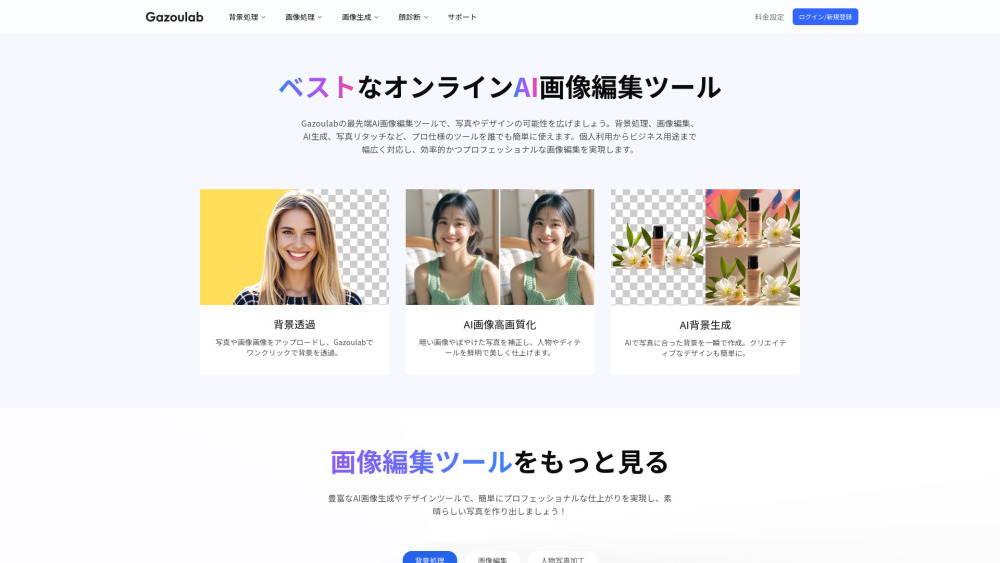
Gazoulab is an AI-powered online image editing tool designed to simplify professional photo editing. It leverages advanced AI to offer features like background removal, background changing, image upscaling (high-quality conversion), and AI background generation. The platform aims to expand the possibilities of photos and designs, providing professional-grade tools that are easy for anyone to use, from individuals to businesses, ensuring efficient and professional image editing. It is a fully online platform accessible via web browser, requiring no installation.
How to use Gazoulab?
To use Gazoulab, simply upload your photo or image to the platform. Once uploaded, you can apply various AI-powered tools such as one-click background removal, background changing, or image upscaling. The intuitive interface makes it easy for even beginners to achieve professional results without complex settings or downloads.
Gazoulab's Core Features
AI Background Removal (Transparency/Deletion)
AI Background Change/Replacement
AI Image Upscaling (Low to High Quality Conversion)
AI Background Generation
Pure Color Background Addition
Gazoulab's Use Cases
Creating transparent backgrounds for product photos or portraits.
Changing backgrounds for e-commerce product images to white or brand-aligned backgrounds.
Updating profile picture backgrounds for social media or business use.
Restoring old or blurry photos to high quality and sharpness.
Generating creative designs with AI-created backgrounds.
Quickly creating promotional images by changing background colors.
FAQ from Gazoulab
What is Gazoulab?
What are Gazoulab's main features?
Is Gazoulab free?
What devices can Gazoulab be used on?
Is Gazoulab suitable for beginners?
What is the difference between Gazoulab and Photoshop?
How can I edit image backgrounds in Gazoulab?
Gazoulab Support Email & Customer service contact & Refund contact etc.
More Contact, visit the contact us page()
Gazoulab Company
Gazoulab Company name: .
Gazoulab Company address: .
More about Gazoulab, Please visit the about us page().
Gazoulab Login
Gazoulab Sign up
Gazoulab Pricing
Gazoulab Pricing Link: https://gazoulab.com/pricing
FAQ from Gazoulab
What is Gazoulab?
Gazoulab is an AI-powered online image editing tool designed to simplify professional photo editing. It leverages advanced AI to offer features like background removal, background changing, image upscaling (high-quality conversion), and AI background generation. The platform aims to expand the possibilities of photos and designs, providing professional-grade tools that are easy for anyone to use, from individuals to businesses, ensuring efficient and professional image editing. It is a fully online platform accessible via web browser, requiring no installation.
How to use Gazoulab?
To use Gazoulab, simply upload your photo or image to the platform. Once uploaded, you can apply various AI-powered tools such as one-click background removal, background changing, or image upscaling. The intuitive interface makes it easy for even beginners to achieve professional results without complex settings or downloads.
What are Gazoulab's main features?
Gazoulab offers AI background removal (one-click deletion), pure color background addition, background replacement (with any image/background), and image quality improvement (upscaling low-resolution photos).
Is Gazoulab free?
Yes, Gazoulab offers a free plan with basic editing features, including 5 credits/month and support for webp/jpeg/png formats. Advanced features like background removal/replacement, product image generation, and image upscaling, along with more credits, require a paid Pro plan (¥500/month or ¥6000/year).
What devices can Gazoulab be used on?
Gazoulab is a fully online platform accessible via web browser on PCs, tablets, and smartphones without any installation.
Is Gazoulab suitable for beginners?
Yes, it is designed with intuitive operability, making it easy for those without image editing experience to start using it. No complex settings or downloads are required.
What is the difference between Gazoulab and Photoshop?
Gazoulab is fully online, browser-accessible, and offers an intuitive interface for quick AI-powered edits, making it easy for beginners. It also has a free plan and an affordable Pro plan (¥500/month). Photoshop, on the other hand, is a professional software with extensive, complex features, a higher learning curve, and a higher monthly cost (from ¥1,078/month).
How can I edit image backgrounds in Gazoulab?
Gazoulab uses AI for background editing. You can use the AI background removal feature to delete backgrounds with one click, or the AI background replacement feature to swap backgrounds with any image or color. These advanced features are included in the Pro plan, which offers 300 credits/month.