
KI-Verzeichnis : AI Agent, AI Developer Tools, AI Workflow, No-Code&Low-Code
What is Sim Studio?
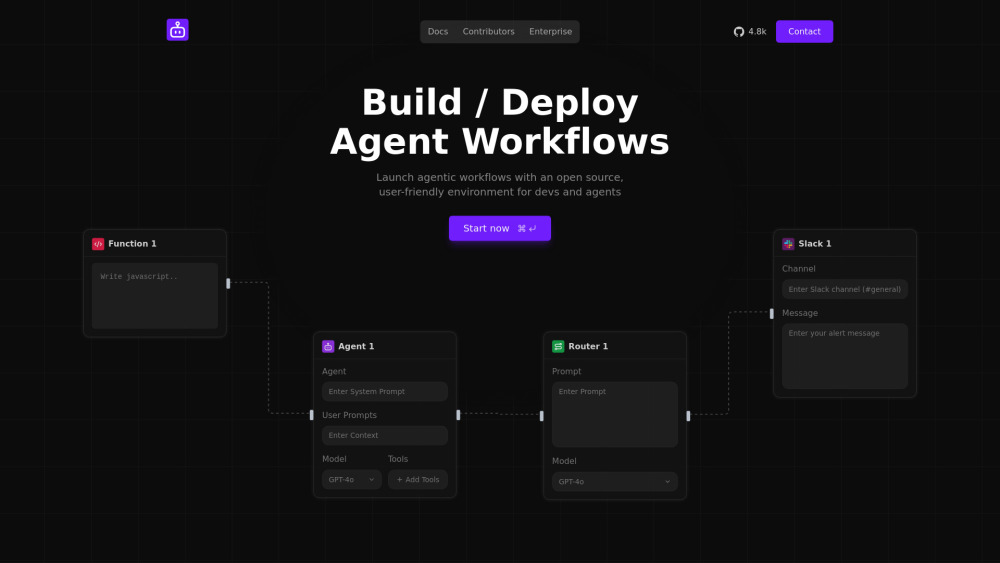
Sim Studio is a platform designed for building and deploying AI agents and automating AI agent workflows. It provides a Figma-like visual canvas that enables users to design, evaluate, and launch intelligent automation workflows. The platform aims to streamline business processes and make AI agent creation accessible to both developers and non-technical users through its drag-and-drop interface and open-source nature.
How to use Sim Studio?
Users can build and deploy AI agents and workflows by utilizing Sim Studio's visual, Figma-like drag-and-drop canvas. The interface allows for connecting various nodes such as 'Agent', 'Router', 'Slack', and 'Function' to design custom workflows. Users can define system prompts, user prompts, add context, select models (e.g., GPT-4o), and integrate tools. Workflows can be launched manually or triggered for automation.
Sim Studio's Core Features
Figma-like visual canvas for building AI agents and workflows
Drag-and-drop interface for designing agentic workflows
Ability to build, write evals, and deploy AI agent workflows
Open-source environment for developers and agents
Seamless integration with existing tools and applications
Ability to sync knowledge by importing data from favorite tools
Pre-built integrations for automating tasks and triggering actions across apps
Support for various nodes like Agent, Router, Slack, and custom Functions (e.g., JavaScript)
Sim Studio's Use Cases
Automating workflows and streamlining business processes using AI agents
Building and deploying custom AI agents for specific tasks
Creating intelligent automation solutions
Integrating AI agents with existing business tools (e.g., Slack)
Developing agentic workflows for developers who prefer visual building over manual coding
FAQ from Sim Studio
What is Sim Studio?
Is Sim Studio open source?
Do I need to be a developer to use Sim Studio?
Can Sim Studio integrate with my existing tools?
What kind of workflows can I build with Sim Studio?
Sim Studio Discord
Here is the Sim Studio Discord: https://discord.gg/Hr4UWYEcTT. For more Discord message, please click here(/discord/hr4uwyectt).
Sim Studio Support Email & Customer service contact & Refund contact etc.
More Contact, visit the contact us page(https://form.typeform.com/to/jqCO12pF)
Sim Studio Company
Sim Studio Company name: Sim Studio .
Sim Studio Company address: .
More about Sim Studio, Please visit the about us page().
Sim Studio Login
Sim Studio Sign up
Sim Studio Pricing
Sim Studio Pricing Link: https://form.typeform.com/to/jqCO12pF
Sim Studio Twitter
Sim Studio Twitter Link: https://x.com/simstudioai
Sim Studio Github
Sim Studio Github Link: https://github.com/simstudioai/sim
FAQ from Sim Studio
What is Sim Studio?
Sim Studio is a platform designed for building and deploying AI agents and automating AI agent workflows. It provides a Figma-like visual canvas that enables users to design, evaluate, and launch intelligent automation workflows. The platform aims to streamline business processes and make AI agent creation accessible to both developers and non-technical users through its drag-and-drop interface and open-source nature.
How to use Sim Studio?
Users can build and deploy AI agents and workflows by utilizing Sim Studio's visual, Figma-like drag-and-drop canvas. The interface allows for connecting various nodes such as 'Agent', 'Router', 'Slack', and 'Function' to design custom workflows. Users can define system prompts, user prompts, add context, select models (e.g., GPT-4o), and integrate tools. Workflows can be launched manually or triggered for automation.
Is Sim Studio open source?
Yes, Sim Studio is an open-source environment for building and deploying AI agent workflows.
Do I need to be a developer to use Sim Studio?
While it offers a user-friendly environment for developers, it also aims to make building agents accessible to non-technical people, suggesting a low-code/no-code approach.
Can Sim Studio integrate with my existing tools?
Yes, Sim Studio allows you to seamlessly connect your agents with tools you already use and import data to power their knowledge bases.
What kind of workflows can I build with Sim Studio?
You can build, write evals, and deploy AI agent workflows that automate tasks and streamline business processes, triggering actions across various applications.