
KI-Verzeichnis : AI Productivity Tools, AI Scheduling, AI Trip Planner
What is Routerra?
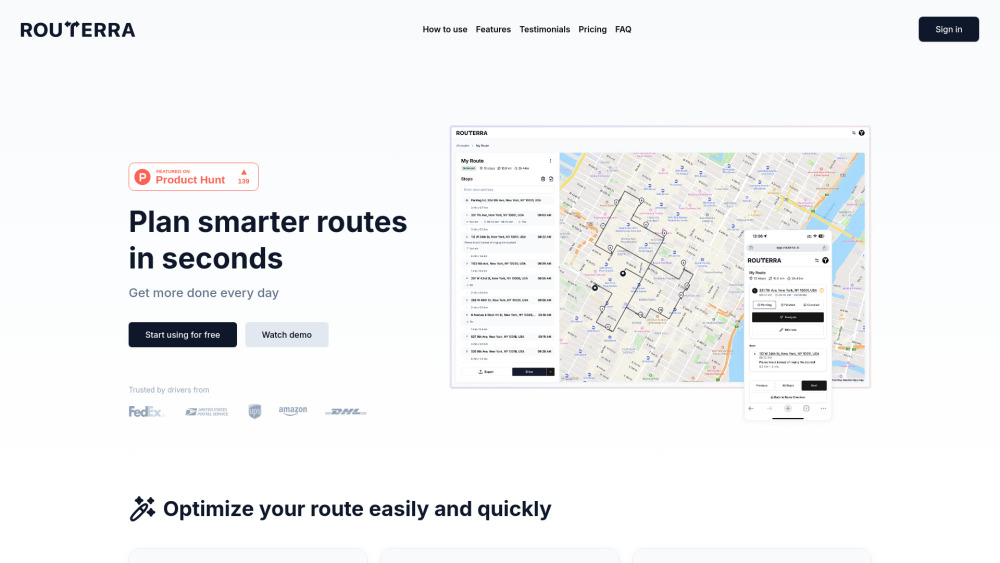
Routerra is a fast, user-friendly route planner designed for couriers, delivery teams, and mobile workers. It utilizes AI to streamline and simplify stop entry from various sources like spreadsheets or images, enabling users to generate optimized routes in seconds. This process aims to save time, fuel, and effort, boosting efficiency and reducing costs for delivery operations.
How to use Routerra?
To use Routerra, first add your stops using search, scanning, or uploading from spreadsheets or images. Next, optimize the route according to your specific needs, vehicle type, or location. Finally, export the optimized route and drive using your favorite GPS navigation, or use Routerra's built-in dispatch features.
Routerra's Core Features
Bulk stops import (AI-assisted from spreadsheets, lists, or photos)
Stop constraints (set arrival windows, priority, stop duration)
Route planning & optimization (traffic aware, set vehicle types, avoid tolls or highways)
Manual adjustments (lock stop order or refine order manually)
Export & share (PDF, Excel, CSV, or public link)
Drive & dispatch (navigate to stops, update delivery statuses and notes)
Routerra's Use Cases
Couriers and delivery teams planning daily routes
Mobile workers needing optimized travel paths
Gig delivery drivers (e.g., Amazon Flex) improving their routes
Logistics operations for companies like UPS, DHL, FedEx, US Postal
Individuals managing multi-stop deliveries like pie delivery
FAQ from Routerra
I have hundreds of stops! How can I quickly add them?
I'm a gig delivery driver. How can I simplify adding stops into Routerra routes?
I drive a large truck. How do I optimize my route to avoid highways and toll roads?
How can I use the optimized route afterward?
Routerra Reddit
Here is the Routerra Reddit: https://www.reddit.com/user/MonkeyAlge
Routerra Support Email & Customer service contact & Refund contact etc.
Here is the Routerra support email for customer service: [email protected] . More Contact, visit the contact us page(mailto:[email protected])
Routerra Company
Routerra Company name: Routerra .
Routerra Login
Routerra Login Link: https://app.routerra.io
Routerra Youtube
Routerra Youtube Link: https://www.youtube.com/@RouterraApp
Routerra Twitter
Routerra Twitter Link: https://x.com/Routerra
Routerra Reddit
Routerra Reddit Link: https://www.reddit.com/user/MonkeyAlge
FAQ from Routerra
What is Routerra?
Routerra is a fast, user-friendly route planner designed for couriers, delivery teams, and mobile workers. It utilizes AI to streamline and simplify stop entry from various sources like spreadsheets or images, enabling users to generate optimized routes in seconds. This process aims to save time, fuel, and effort, boosting efficiency and reducing costs for delivery operations.
How to use Routerra?
To use Routerra, first add your stops using search, scanning, or uploading from spreadsheets or images. Next, optimize the route according to your specific needs, vehicle type, or location. Finally, export the optimized route and drive using your favorite GPS navigation, or use Routerra's built-in dispatch features.
I have hundreds of stops! How can I quickly add them?
You can quickly add hundreds of stops using Routerra's AI-Import feature, which supports importing from any spreadsheets, lists, or photos.
I'm a gig delivery driver. How can I simplify adding stops into Routerra routes?
As a gig delivery driver, you can simplify adding stops by using Routerra's AI to streamline and simplify stop entry from spreadsheets or images.
I drive a large truck. How do I optimize my route to avoid highways and toll roads?
You can optimize your route to avoid highways and toll roads by setting your vehicle type and preferences within Routerra's route planning and optimization features.
How can I use the optimized route afterward?
After optimizing, you can export and share your route as a PDF, Excel, or CSV file, or via a public link. You can also use the drive & dispatch feature to navigate to stops and update delivery statuses and notes.