
KI-Verzeichnis : AI Animation Generator, AI Avatar Video Generator, AI Cartoon Video Generator, AI Lip Sync Generator, AI Short Video Generator, AI Video Generator, Image to Video, Video to Video
What is LipSync.video?
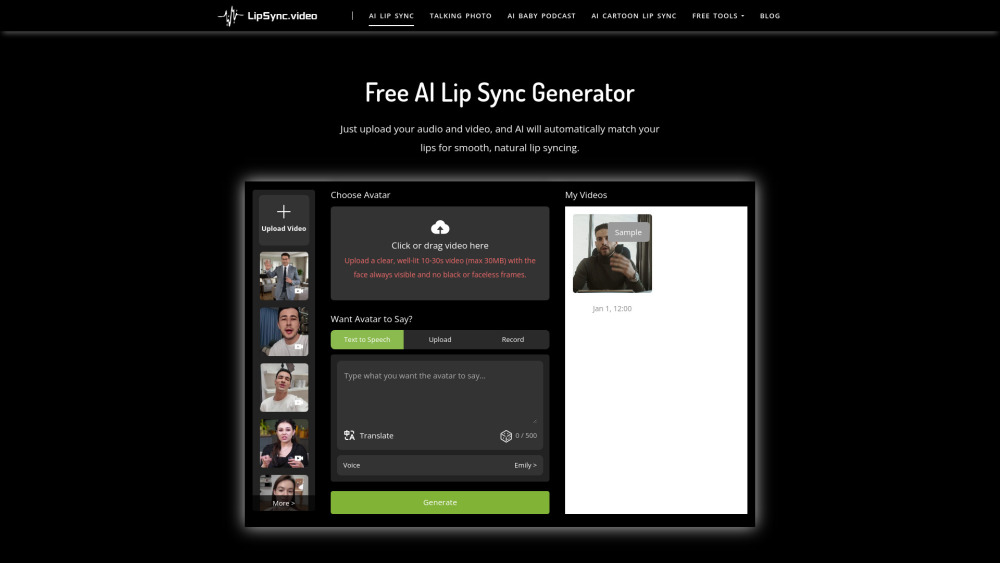
LipSync is a free online AI tool that allows users to create lifelike lip-synced videos without requiring any sign-up. It uses advanced AI technology to automatically match audio to visuals, enabling various applications such as bringing cartoons to life, making pets talk, transforming photos into talking videos, and creating AI baby podcasts. The platform is designed to be fast, accurate, and easy to use, generating natural-looking lip animations for dubbed content, virtual avatars, and more.
How to use LipSync.video?
To use LipSync, first upload your video and audio assets (or choose from customizable templates). Ensure the video is clear, well-lit, 10-30 seconds long (max 30MB), with the face always visible. Then, click the 'Generate' button to let the AI technology create the lip-sync animations. Once processing is complete, you can download your high-quality lip-sync video.
LipSync.video's Core Features
AI Lip Sync
AI Cartoon Lip Sync
AI Baby Podcast
AI Talking Photo
AI Pet Lip Sync
Text to Speech option
LipSync.video's Use Cases
Bringing cartoons to life for animated series, game cutscenes, or YouTube shorts.
Transforming podcasts into vivid and lifelike baby images for social media engagement.
Turning photos into talking videos for birthday wishes, social sharing, product promotion, education, and teaching.
Making pets talking stars for pet influencers, TikTok creators, or fun pet brand ads.
Creating natural-looking lip animations for dubbed content and virtual avatars.
FAQ from LipSync.video
What is AI Lip Sync?
What video formats are supported for AI lip sync?
How do I upload a video and use the lip sync feature?
How accurate is the AI lip sync?
How long does it take to process the video?
Can I download the synced video?
Can I make changes or cancel after uploading the video?
How can I get help if I encounter technical issues?
LipSync.video Support Email & Customer service contact & Refund contact etc.
More Contact, visit the contact us page()
LipSync.video Company
LipSync.video Company name: LipSync .
LipSync.video Company address: .
More about LipSync.video, Please visit the about us page().
LipSync.video Login
LipSync.video Sign up
FAQ from LipSync.video
What is LipSync.video?
LipSync is a free online AI tool that allows users to create lifelike lip-synced videos without requiring any sign-up. It uses advanced AI technology to automatically match audio to visuals, enabling various applications such as bringing cartoons to life, making pets talk, transforming photos into talking videos, and creating AI baby podcasts. The platform is designed to be fast, accurate, and easy to use, generating natural-looking lip animations for dubbed content, virtual avatars, and more.
How to use LipSync.video?
To use LipSync, first upload your video and audio assets (or choose from customizable templates). Ensure the video is clear, well-lit, 10-30 seconds long (max 30MB), with the face always visible. Then, click the 'Generate' button to let the AI technology create the lip-sync animations. Once processing is complete, you can download your high-quality lip-sync video.
What is AI Lip Sync?
AI Lip Sync is a technology that uses artificial intelligence to automatically align the mouth movements of characters in a video with the audio or speech, making it appear as if they are speaking the words.
What video formats are supported for AI lip sync?
We support common video formats such as MP4, MOV, etc. If you have a specific format, please contact our support team.
How do I upload a video and use the lip sync feature?
Simply select your video file on our upload page, choose the audio track you want to sync to, hit the Generate button, and our system will automatically take care of the lip sync for you.
How accurate is the AI lip sync?
Our AI technology provides highly accurate lip syncing, ensuring that the character’s mouth movements match the audio content naturally and seamlessly.
How long does it take to process the video?
Processing time depends on the length and complexity of the video. Most videos are processed within a few minutes to half an hour.
Can I download the synced video?
Yes, once the lip sync process is complete, you can download the processed video directly from the platform.
Can I make changes or cancel after uploading the video?
Once the video processing begins, changes or cancellations are not possible. Please make sure your video and audio files are accurate before uploading.
How can I get help if I encounter technical issues?
If you experience any issues, you can submit a support request through our contact page or email us directly. Our customer service team will assist you promptly.