
AI Directory : AI Analytics Assistant, Browser Extension, Large Language Models (LLMs)
What is ChatGPT Helper - GPTab Chrome Extension ai chrome extension?
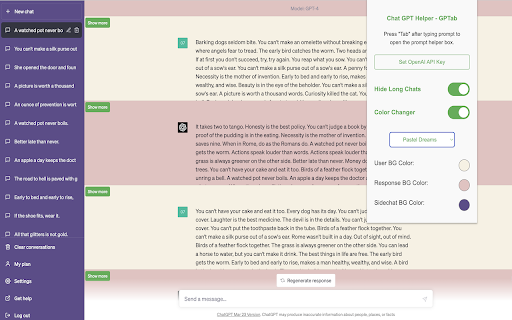
Supercharge your ChatGPT experience with the ChatGPT Helper - GPTab Chrome Extension! Unlock the power of GPT-3.5 Turbo for smarter interactions, customize your chat interface with vibrant colors, and declutter your view by hiding long chats.
How to use ChatGPT Helper - GPTab Chrome Extension ai chrome extension?
To use ChatGPT Helper - GPTab Chrome Extension, install the extension, set your OpenAI API key, and access chat.openai.com. Press the "Tab" key while typing a message for AI assistance.
ChatGPT Helper - GPTab Chrome Extension ai chrome extension's Core Features
Integrated GPT-3.5 Turbo assistant
Customizable colors
Hide long chats
ChatGPT Helper - GPTab Chrome Extension ai chrome extension's Use Cases
Enhancing chat input with AI suggestions
Personalizing chat interface colors
Improving chat readability by hiding long messages
FAQ from ChatGPT Helper - GPTab Chrome Extension - Chrome Extension
What is ChatGPT Helper - GPTab Chrome Extension?
Supercharge your ChatGPT experience with the ChatGPT Helper - GPTab Chrome Extension! Unlock the power of GPT-3.5 Turbo for smarter interactions, customize your chat interface with vibrant colors, and declutter your view by hiding long chats.
How to use ChatGPT Helper - GPTab Chrome Extension?
To use ChatGPT Helper - GPTab Chrome Extension, install the extension, set your OpenAI API key, and access chat.openai.com. Press the "Tab" key while typing a message for AI assistance.
How to access the GPT-3.5 Turbo assistant?
Press the "Tab" key during message typing in the chat input field to activate the AI assistance.