
AI Directory : AI Assistant, AI Chatbot, AI Web Scraping
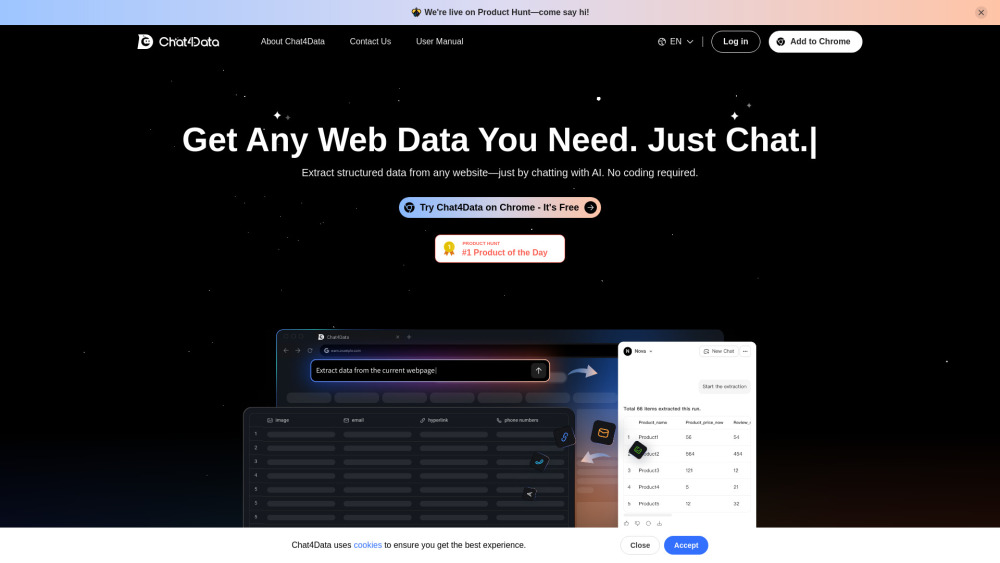
What is Chat4Data?
Chat4Data is an AI-powered Chrome extension designed to be your ultimate data collection assistant. It allows users to effortlessly extract and organize web page data using intuitive natural language commands or simple quick-click actions. It extracts structured data from any website without requiring coding skills, making information gathering faster and smarter.
How to use Chat4Data?
To use Chat4Data, first, download and install the extension from the Chrome Web Store. Second, sign up for a free Chat4Data account and log in. Third, enable the extension on your target website and use natural language commands to chat with the website and extract the data you need.
Chat4Data's Core Features
Extract structured data from any website using AI chat (no coding required)
Auto-detects and extracts valuable data with presets for 10x faster results
Extracts various data types including images, links, emails, phone numbers, and hidden elements
Allows users to prompt data directly to a spreadsheet by describing needs
Automates pagination to scrape every page for complete data listings
Natural language commands to add, remove, or fix data fields
Supports data download in Excel format
Chat4Data's Use Cases
Extracting structured data from any website
Scraping listing pages, particularly on e-commerce sites like Amazon
Collecting specific data types such as images, links, emails, and phone numbers
Automating data collection across multiple pages with pagination
FAQ from Chat4Data
What is Chat4Data?
What types of websites can I scrape using Chat4Data?
Is Chat4Data free to use?
Do I need coding skills to use Chat4Data?
How do I change the data fields I'm extracting?
What file formats does Chat4Data support?
Does Chat4Data save my past scraping sessions?
Chat4Data Support Email & Customer service contact & Refund contact etc.
More Contact, visit the contact us page(https://chat4data.ai/contact-us)
Chat4Data Company
Chat4Data Company name: Lumoris Technologies Inc. .
More about Chat4Data, Please visit the about us page(https://chat4data.ai/about).
Chat4Data Login
Chat4Data Login Link: https://chat4data.ai/login
Chat4Data Youtube
Chat4Data Youtube Link: https://www.youtube.com/@chatfordata
Chat4Data Twitter
Chat4Data Twitter Link: https://x.com/chat4data
Chat4Data Instagram
Chat4Data Instagram Link: https://www.instagram.com/chat4data/
FAQ from Chat4Data
What is Chat4Data?
Chat4Data is an AI-powered Chrome extension designed to be your ultimate data collection assistant. It allows users to effortlessly extract and organize web page data using intuitive natural language commands or simple quick-click actions. It extracts structured data from any website without requiring coding skills, making information gathering faster and smarter.
How to use Chat4Data?
To use Chat4Data, first, download and install the extension from the Chrome Web Store. Second, sign up for a free Chat4Data account and log in. Third, enable the extension on your target website and use natural language commands to chat with the website and extract the data you need.
What types of websites can I scrape using Chat4Data?
Chat4Data supports most HTML websites, even those with intricate structures. Right now, it's optimized for scraping listing pages, particularly on e-commerce sites such as Amazon.
Is Chat4Data free to use?
New users get 1 million free tokens to test Chat4Data. After that, top-ups cost just $1 per million tokens.
Do I need coding skills to use Chat4Data?
No coding needed! Chat4Data's AI makes data collection effortless—just use natural language commands to get what you need.
How do I change the data fields I'm extracting?
It's easy - just use natural language! For example: Add a field: Say "Add price field," and Chat4Data will include it. Remove a field: Command "Delete rating field" to drop unwanted data. Fix extraction: Ask to "Re-analyze this page" if results need tweaking. No menus or coding, just tell Chat4Data what you need!
What file formats does Chat4Data support?
Currently, Chat4Data lets you download scraped data in Excel format.
Does Chat4Data save my past scraping sessions?
Not yet. Historical sessions and data storage aren't currently supported. To avoid losing your data, we recommend downloading it right after collection. Stay tuned for updates!