
AI Directory : AI Accounting, AI API, AI Project Management, Log Management
What is AICosts.ai?
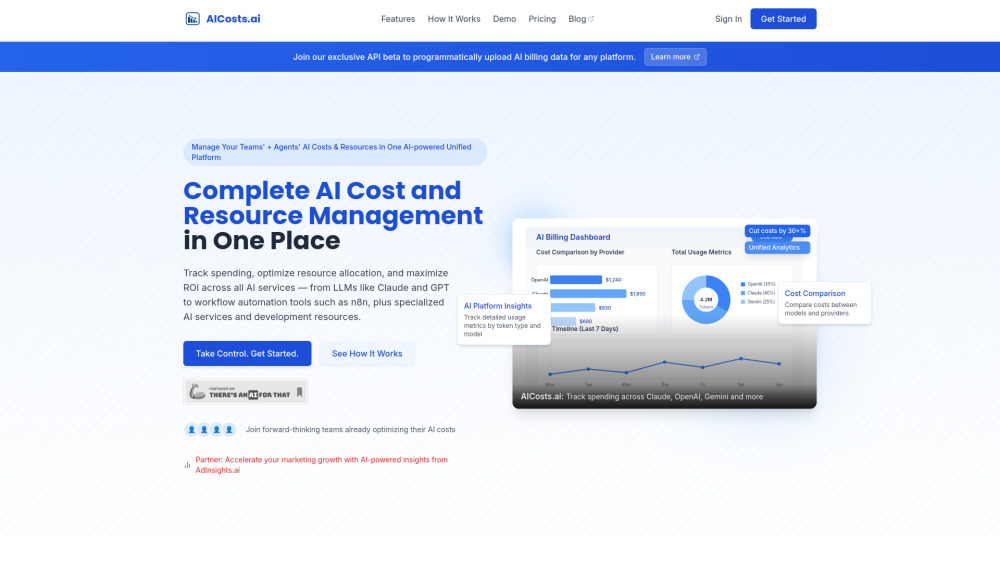
AICosts.ai is a comprehensive AI cost and resource management platform that provides unified visibility and control over your entire AI spending ecosystem. Track, analyze, and optimize your spending across all AI services — from LLMs like Claude, GPT, and Gemini to AI workflow tools like Make, Zapier, and n8n, plus specialized AI services like Tavily, Pinecone, and RunwayML — all in one unified dashboard.
How to use AICosts.ai?
Step 1: Connect Your AI Services Select and integrate your AI providers from the extensive list including OpenAI, Claude, Gemini, Make, Zapier, n8n, Pinecone, RunwayML, and 100+ other services. Use our API (beta exclusive access) for programmatic data sync or upload billing files manually. Step 2: Set Up Cost Tracking Configure your dashboard by choosing which AI service/provider to track. Set up budget alerts and quota monitoring to prevent unexpected charges. Step 3: Analyze and Optimize Review unified analytics showing cost breakdowns, usage patterns, and spending trends. Compare costs across different models and providers. Use the platform's recommendations to identify optimization opportunities and switch to more cost-effective alternatives. Step 4: Monitor and Scale Set up automated alerts for spending thresholds and quota limits. Export detailed reports for financial planning and team accountability. Continuously monitor ROI across your AI investments and adjust resource allocation based on performance data.
AICosts.ai's Core Features
Complete AI Stack Tracking: Monitor costs across 50+ AI platforms including OpenAI, Anthropic Claude, Google Gemini, RunwayML, ElevenLabs, and more.
Unified Dashboard: Stop juggling between multiple billing portals. Our dashboard brings everything together, helping you track, analyze, and optimize your AI spending across your entire AI stack.
Cross-Platform Cost Comparison: Compare costs across providers, models, and services to identify the best value combinations.
Usage Analytics: Track spending trends, usage patterns, and billing cycles with detailed breakdowns by model and token usage.
AI Agent Workflow Tracking: Monitor costs and token usage for automated workflows in n8n, Make.com, and Zapier.
Billing Alerts: Set up notifications for upcoming payments and never be surprised by AI bills.
AICosts.ai's Use Cases
AI Automation Agencies managing multiple client AI costs
AI-First Startups tracking rapid scaling expenses
SaaS Companies integrating AI across their products
CTOs & Technical Leads optimizing AI budgets
Finance Teams managing enterprise AI spending
Solopreneurs & Freelancers: Optimize personal AI tool expenses, track project costs, and identify the most cost-effective tools for different tasks.
Content Creators: Track AI tool expenses for video generation, image creation, voice synthesis, and content automation workflows.
E-commerce Teams: Monitor AI costs for product descriptions, customer support automation, and personalization features.
FAQ from AICosts.ai
Which AI platforms does AICosts.ai support?
How does AICosts.ai connect to my AI services?
Can I track AI agent and workflow costs?
How much can I save using AICosts.ai?
Is there a free trial?
Can I export my cost data?
How secure is my billing data?
Do you offer custom integrations?
AICosts.ai Support Email & Customer service contact & Refund contact etc.
More Contact, visit the contact us page()
AICosts.ai Company
AICosts.ai Company name: .
AICosts.ai Company address: .
More about AICosts.ai, Please visit the about us page().
AICosts.ai Login
AICosts.ai Sign up
FAQ from AICosts.ai
What is AICosts.ai?
AICosts.ai is a comprehensive AI cost and resource management platform that provides unified visibility and control over your entire AI spending ecosystem. Track, analyze, and optimize your spending across all AI services — from LLMs like Claude, GPT, and Gemini to AI workflow tools like Make, Zapier, and n8n, plus specialized AI services like Tavily, Pinecone, and RunwayML — all in one unified dashboard.
How to use AICosts.ai?
Step 1: Connect Your AI ServicesnSelect and integrate your AI providers from the extensive list including OpenAI, Claude, Gemini, Make, Zapier, n8n, Pinecone, RunwayML, and 100+ other services. Use our API (beta exclusive access) for programmatic data sync or upload billing files manually.nStep 2: Set Up Cost TrackingnConfigure your dashboard by choosing which AI service/provider to track. Set up budget alerts and quota monitoring to prevent unexpected charges.nStep 3: Analyze and OptimizenReview unified analytics showing cost breakdowns, usage patterns, and spending trends. Compare costs across different models and providers. Use the platform's recommendations to identify optimization opportunities and switch to more cost-effective alternatives.nStep 4: Monitor and ScalenSet up automated alerts for spending thresholds and quota limits. Export detailed reports for financial planning and team accountability. Continuously monitor ROI across your AI investments and adjust resource allocation based on performance data.
Which AI platforms does AICosts.ai support?
We support 50+ AI services including OpenAI, Claude, Gemini, Mistral, Make, Zapier, n8n, Pinecone, RunwayML, ElevenLabs, Tavily, and many more. New platforms are added regularly based on user requests.
How does AICosts.ai connect to my AI services?
We offer multiple connection methods: Use our API (beta exclusive access) for programmatic data sync, manual billing file uploads (CSV, PDF, or JSON), and webhook integrations for real-time tracking (TBA on request).
Can I track AI agent and workflow costs?
Yes! Add logging nodes to your n8n, Make, or Zapier workflows to capture operation details. Upload the logs to get detailed cost analysis for your AI automation workflows (our sign up for our API to just issue a call from the workflow itself).
How much can I save using AICosts.ai?
Users report average savings of 30%+ on their AI expenses by identifying cost-effective alternatives, optimizing usage patterns, and eliminating unnecessary spending.
Is there a free trial?
Yes, all plans include a 7-day free trial
Can I export my cost data?
Professional and Enterprise plans include full data export capabilities in CSV and Excel formats for financial reporting and analysis.
How secure is my billing data?
We use enterprise-grade security with encrypted data transmission and storage.
Do you offer custom integrations?
Yes, Enterprise customers can request custom integrations for proprietary AI services or specialized tracking requirements.