
AI Directory : AI Face Swap Generator, AI Face Swap Video, AI GIF Generator, AI Image Generator, AI Photo Editor, AI UGC Video Generator, AI Yearbook, Gender Swap AI, Image to Image
What is AI Face Swap?
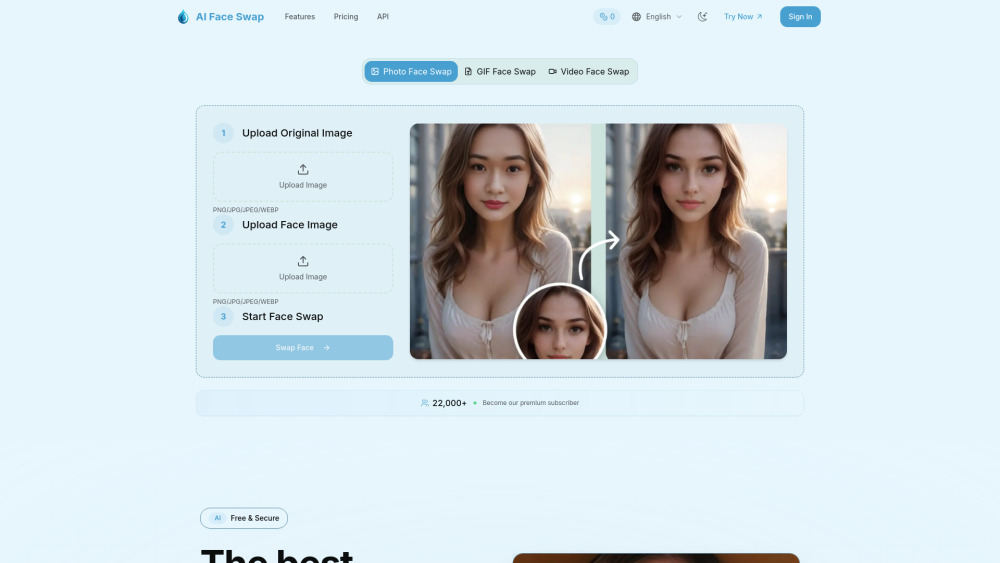
AI Face Swap utilizes cutting-edge AI technology to deliver seamless, realistic face swapping for photos, GIFs and video. The platform features an intuitive, user-friendly interface that allows anyone to create professional-quality face swaps with just a few clicks. Our advanced deep learning models analyze facial features, expressions, and lighting conditions to ensure natural-looking results every time. Users can upload their own images or choose from various preset options, with the ability to swap single faces or multiple faces in group photos. The technology maintains facial expressions, skin tones, and lighting consistency for truly believable transformations. All processing happens securely with privacy protection measures in place - images are automatically deleted after processing. Whether for entertainment, creative projects, or professional content creation, AI Face Swap delivers high-quality results that can be downloaded in various formats. The platform is perfect for social media content creators, digital artists, and anyone looking to have fun with face swapping technology.
How to use AI Face Swap?
Quick Start Guide Transform your photos in just 3 simple steps with our advanced AI face swap technology: Step 1: Upload Original Image Click on the "Upload Original Image" area Select a clear photo that contains the face you want to replace Supported formats: PNG, JPG, JPEG, WEBP Tip: Use well-lit photos with clearly visible faces for best results Step 2: Upload Face Photo Click on the "Upload Face Photo" area Choose the face image you want to swap into the original photo Make sure the face is clearly visible and well-centered Tip: Front-facing photos work better than side profiles Step 3: Start Face Swap Click the "Swap Face" button to begin the AI processing Our advanced AI will analyze both images and perform the face swap Processing typically takes 5-10 seconds Wait for the magic to happen!
AI Face Swap's Core Features
ai photo face swap
ai gif face swap
ai video face swap
AI Face Swap's Use Cases
Social Media Content: Create engaging, shareable content for platforms like Instagram, TikTok, and Facebook
Entertainment: Have fun swapping faces with celebrities, friends, or fictional characters
Creative Projects: Add unique visual elements to digital art, memes, or personal projects
Event Marketing: Create memorable promotional materials for parties, weddings, or corporate events
Content Creation: Develop eye-catching thumbnails and visuals for videos, blogs, or websites
Education: Demonstrate facial recognition technology and AI capabilities in educational settings
App Development: Integrate face swap functionality into mobile apps and web applications
FAQ from AI Face Swap
How long does processing take?
Can I swap faces in videos?
Is my personal information safe?
AI Face Swap Support Email & Customer service contact & Refund contact etc.
Here is the AI Face Swap support email for customer service: [email protected] . More Contact, visit the contact us page(https://aifaceswap.app/#contact)
AI Face Swap Company
AI Face Swap Company name: AI Face Swap .
AI Face Swap Company address: .
More about AI Face Swap, Please visit the about us page().
AI Face Swap Login
AI Face Swap Login Link: https://aifaceswap.app/#login
AI Face Swap Sign up
AI Face Swap Sign up Link: https://aifaceswap.app/#signup
FAQ from AI Face Swap
What is AI Face Swap?
AI Face Swap utilizes cutting-edge AI technology to deliver seamless, realistic face swapping for photos, GIFs and video. The platform features an intuitive, user-friendly interface that allows anyone to create professional-quality face swaps with just a few clicks. Our advanced deep learning models analyze facial features, expressions, and lighting conditions to ensure natural-looking results every time. Users can upload their own images or choose from various preset options, with the ability to swap single faces or multiple faces in group photos. The technology maintains facial expressions, skin tones, and lighting consistency for truly believable transformations. All processing happens securely with privacy protection measures in place - images are automatically deleted after processing. Whether for entertainment, creative projects, or professional content creation, AI Face Swap delivers high-quality results that can be downloaded in various formats. The platform is perfect for social media content creators, digital artists, and anyone looking to have fun with face swapping technology.
How to use AI Face Swap?
Quick Start GuidenTransform your photos in just 3 simple steps with our advanced AI face swap technology:nStep 1: Upload Original ImagenClick on the "Upload Original Image" areanSelect a clear photo that contains the face you want to replacenSupported formats: PNG, JPG, JPEG, WEBPnTip: Use well-lit photos with clearly visible faces for best resultsnStep 2: Upload Face PhotonClick on the "Upload Face Photo" areanChoose the face image you want to swap into the original photonMake sure the face is clearly visible and well-centerednTip: Front-facing photos work better than side profilesnStep 3: Start Face SwapnClick the "Swap Face" button to begin the AI processingnOur advanced AI will analyze both images and perform the face swapnProcessing typically takes 5-10 secondsnWait for the magic to happen!
How long does processing take?
Most face swaps complete within 5-10 seconds. Processing time may vary based on image complexity and server load. Premium users enjoy priority processing for faster results.
Can I swap faces in videos?
Yes! Our Video Face Swap feature allows you to replace faces in video content. This feature is available for premium subscribers with certain duration and file size limits.
Is my personal information safe?
Yes. We use industry-standard encryption (SSL/TLS) to protect all data transmission. Your personal information is encrypted and stored securely, and we never sell or share your data with third parties.